Facebook Events is a feature on Facebook that helps individuals, businesses, and organizations create and promote events. It’s designed to help users discover happenings in their local area—perfect for our own city Kingston, Ontario, where community spirit is strong, and people love to get involved in local activities.
Whether you’re organizing a market, a concert, or a charity fundraiser, Facebook Events lets you easily spread the word and keep track of who’s coming. It’s a fantastic tool for local Kingston events, helping you reach your neighbours and visitors who are looking for something to do.
When Should You Create a Facebook Event?
Facebook Events is a go-to tool for a wide variety of local occasions in Kingston, including:
- Community Gatherings: Whether you’re hosting a street festival, farmers’ market, or a charity walk around Lake Ontario, Facebook Events can help you bring people together.
- Local Business Promotions: Kingston’s independent shops and cafes can use Facebook Events to promote in-store events like grand openings, special discounts, or pop-up sales.
- Social Events: From birthdays to family gatherings, community parties or even a Kingston trivia night at a local pub—Facebook Events helps you keep everyone in the loop.
How to Create a Facebook Event?
Creating a Facebook Event is quick and easy. Just follow these steps:
- Go to Facebook Events:
- Go to Your Profile: Open your Facebook profile page.
- Select the More Dropdown Menu: Click on the “More” button, which is usually located under your cover photo or in the navigation menu.
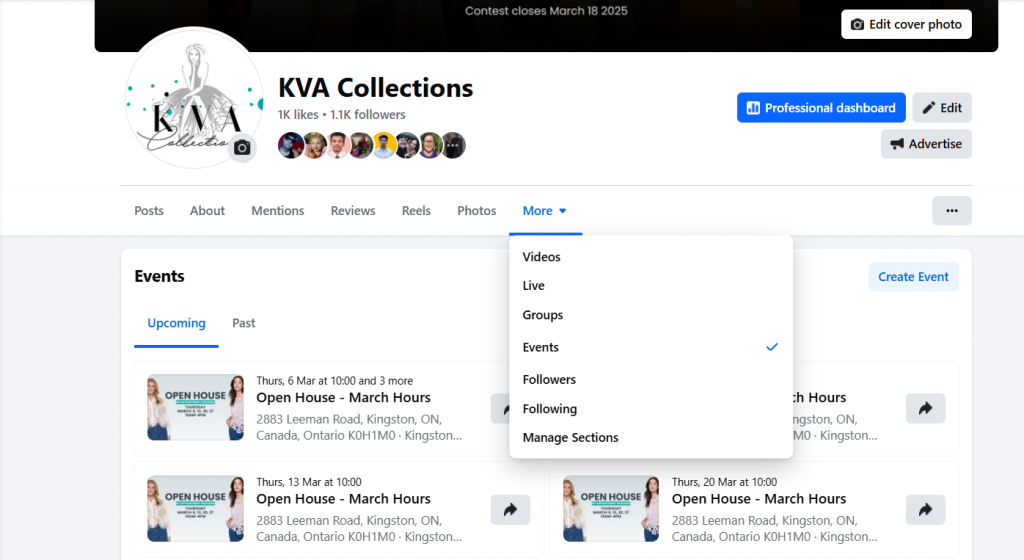
2. Click ‘Create New Event’:
- Tap “Create New Event” on your right hand side.

3. Choose Your Event Type:
- Select whether your event is Online or In-Person. For local events in Kingston, most will be in-person, but you can also create online events if you’re hosting a webinar or livestream.
4. Add Event Details:
- Include all the essential details: event name, date, time, and location (e.g., a local Kingston park, venue, or community centre). Don’t forget to provide a short description of the event to help people know what to expect.
5. Add Cover Photo:
- Choose a vibrant and relevant cover photo – it must be something related to the event
6. Publish Your Event:
- When everything looks good, click Create to publish your event. It will be shared with your audience and appear in their event feeds.
Benefits of Facebook Events
- When you create an event, it’s shown in Facebook’s local event feed, helping people in Kingston easily discover what’s happening nearby.
- Facebook allows users to RSVP directly on the event page, which helps you track the expected number of attendees, making event planning easier.
- You can make last-minute changes or share important announcements, like weather updates or parking instructions, in real-time with event attendees. This is especially useful for Kingston’s outdoor events.
If you’re hosting an event in Kingston, give Facebook Events a try and watch the local buzz grow! If you need help using Facebook Events—don’t hesitate, book a 15-minute call with us. We will help you organise and set up your event to ensure that it reaches the right audience and runs smoothly!