As a business — keeping your Instagram account professional is key. Thankfully, Instagram has some handy tools that can help you filter out spam and unwanted interactions. Here is how to set them up in a few easy steps:
Enable ‘Comment Filtering’ to Block Spam
You can make sure your comments stay clean and professional by automatically hiding any spammy or offensive ones.
Here’s what to do:
- Tap the three lines in the top-right corner of your profile page.
- Go to ‘How others can interact with you’.
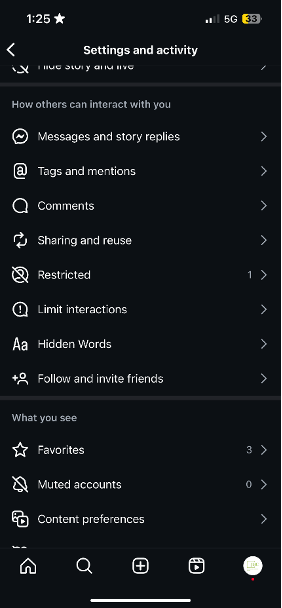
- Look for the Hidden Words section and toggle on Hide Comments, Advanced Comment Filtering, and Hide Message Requests. This will automatically filter out any offensive or spammy comments.
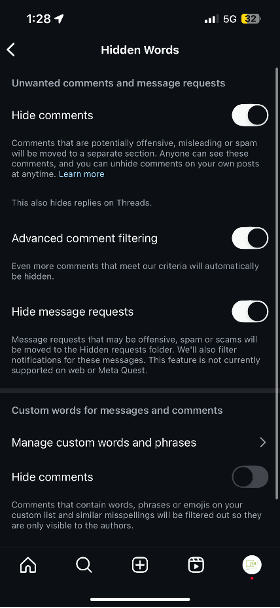
- If you want to filter out specific words, scroll down to Custom Words for Messages and Comments >> Click on Manage Custom Words and Phrases. Here, you can add words (separated by commas) to create a list of words often used in spam.
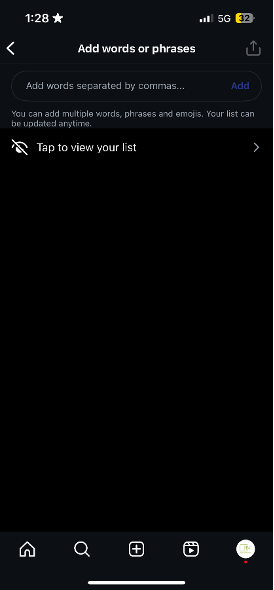
Some examples: links, promote, free, buy followers, DM for promo, increase sales, earn money, limited offer, guaranteed, urgent, work from home, winner, prize, unsecured, promo code, special deal, act now, fast cash, get rich, discount link, hurry up, bitcoin, violated, violation, copyright, infringement.
If you are managing a business and struggling to get rid of spammers, follow the steps in this blog. If you are still facing challenges, don’t worry – book a free 15-minute call with JBC to help us understand your issue, and we will be happy to assist you.