With the ever-increasing use of AI in today’s digital world, you may have wondered if ChatGPT could be used to create a website for your small business. We decided to put it to the test to find out.
As it turns out, it was entirely capable of this task. Working through multiple rounds of revisions with the large language model (LLM), we provided feedback on colours, content, imagery and more. Each time, ChatGPT provided a ready-to-use HTML file, as well as the corresponding CSS file. For us to run and test the website in a browser, all we had to do was place these files into a folder and open the index.html file with Google Chrome (or your favourite web browser). While this won’t publish your website to the world, it is a great way to build behind-the-scenes until you are ready to hit publish.
Initial Prompts
First, we asked ChatGPT if it could help create a basic website for a local dance studio. It responded enthusiastically, citing its ability to help narrow down website platforms and make comparisons between each. While this is another great way to use AI, we really wanted to know if it was capable of building the entire website for us, so we asked: Instead of using a website platform, would you be able to code and build out the entire website structure/design etc. if I just answer questions? Plain HTML and CSS/JS is fine, I can publish that on my hosting account.
What You’ll Need
To run through this exercise with ChatGPT yourself, you’ll want to have a simple text editor available on your computer. We recommend Sublime Text. This will be used to copy/paste the HTML and CSS provided by the chat engine into files that you can save to your computer. Each time ChatGPT provides you with a new iteration of the code, you can simply replace the contents of the HTML or CSS. Refresh your browser each time you make changes so that you can check the results and ask ChatGPT to make further changes if needed.
To publish your website to the world, you’ll then need access to a product called Web Hosting. This can be purchased through a myriad of providers, GoDaddy being one of the most prominent. With some tech support from your service provider, you can upload the HTML and CSS files straight to a file directory that connects to your registered domain. Voila – your website should be live!
Our Results
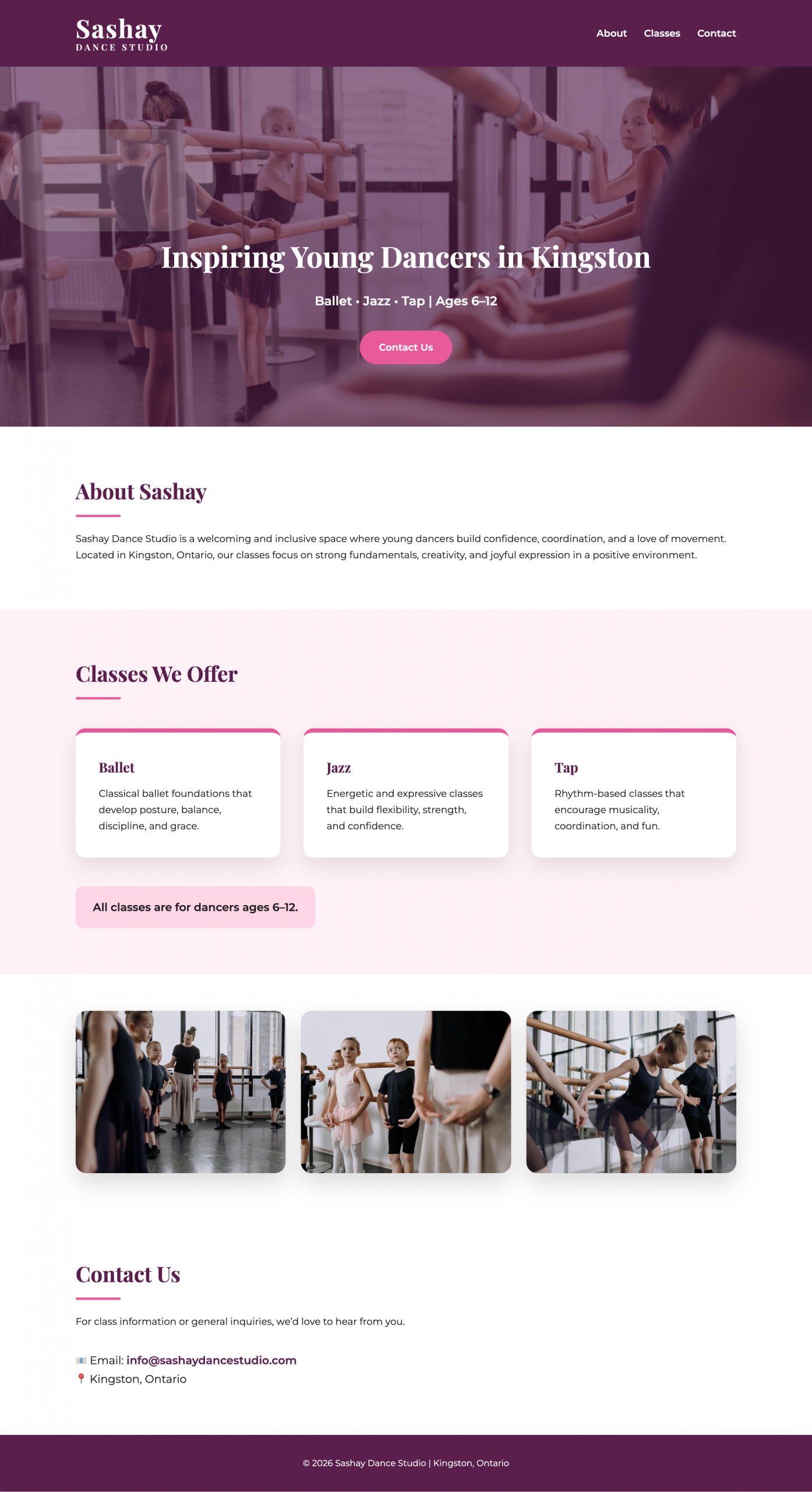
Here you can see an image version of what ChatGPT was able to create for our fictional dance studio, Sashay. Curious to try it for yourself? Let us know how it goes!
Next Steps
If you’ve taken this route (or another DIY approach) to create your business website, but it’s still not bringing in qualified leads for your business, that could be a sign it’s time to phone-a-friend (or a professional).
JBC can provide website audits or professional web support on an as-needed basis to help you reach your business marketing goals. Ready to chat? Book a call here.