Instagram is a great place to share images and videos with friends, family, and clients. It’s a platform that has undoubtedly been a game changer in the digital world.
It might be terrifying to discover that your Instagram account has been hacked, especially if your income depends on Instagram for lead generation and sales.
So, what can you do to prevent your Instagram account from being hacked or altered?
Here are the best three ways to secure your Instagram.
1. Enable Two-Factor Authentication.
The additional layer of security provided by two-factor authentication helps to resist hacking.
How does it function? Users must go through a number of steps and confirm their identification by entering a security code. If you log into Instagram from an unidentified device, you’ll be asked to input the code and verify that it’s you.
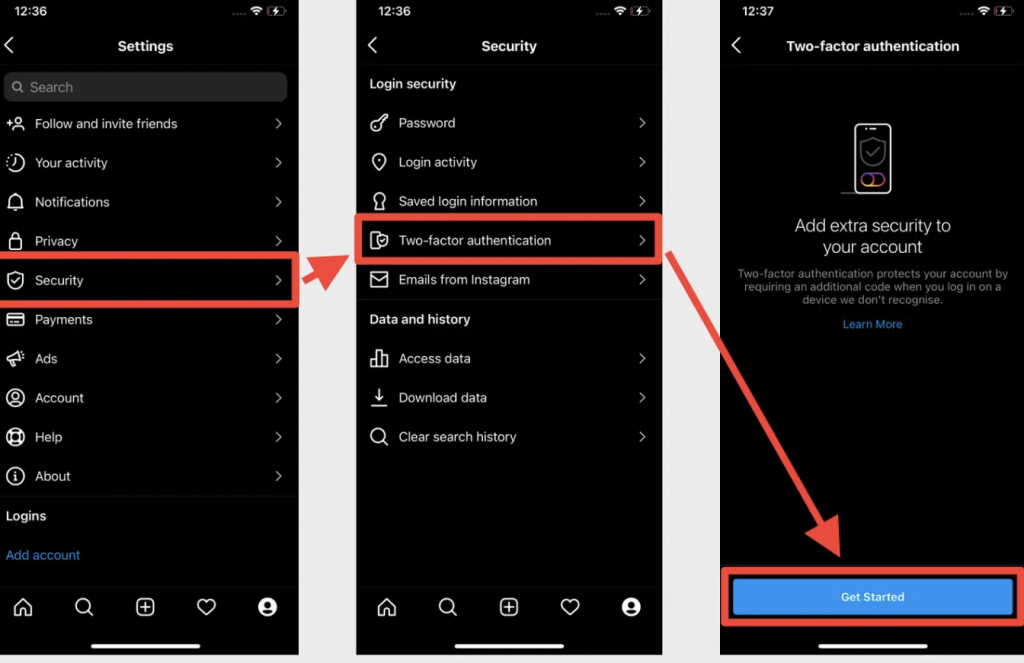
Go to your Settings and select “Two-Factor Authentication” to enable two-factor authentication on Instagram.
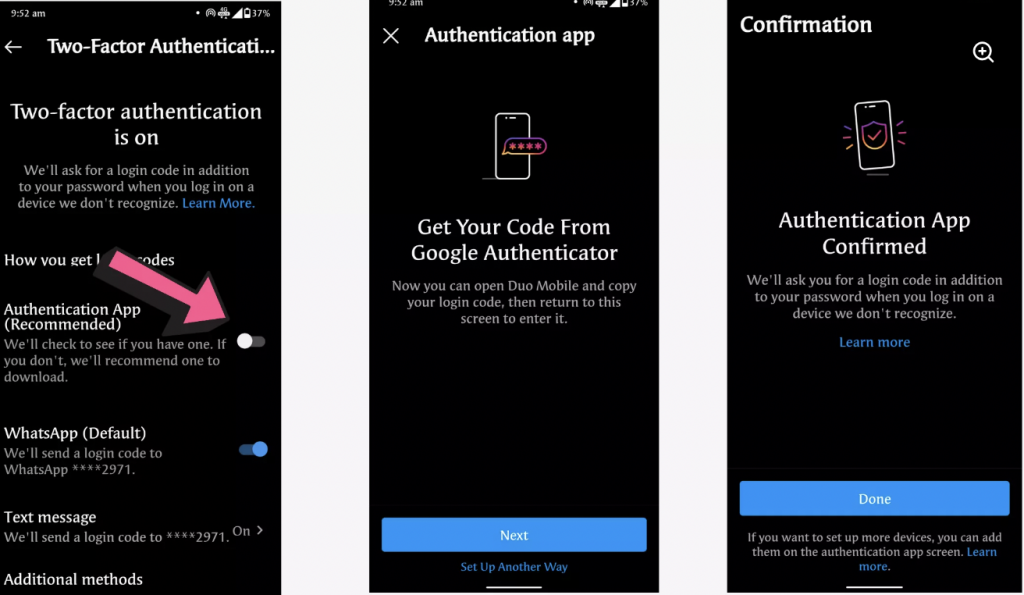
When you tap “Get Started,” there are three choices: “Authentication App (recommended)”, “Whatsapp “and “Text Message.”
Option 1: Authentication App (recommended)
An external authentication app is available under the “Authentication App (recommended)” option.
Instagram will automatically locate and deliver a code to any authentication apps you may already have installed. To enable two-factor authentication, you must find the code and enter it on Instagram.
If you don’t already have an account, Instagram will suggest an authentication app for you to download before continuing the procedure.
Option 2: Text Message
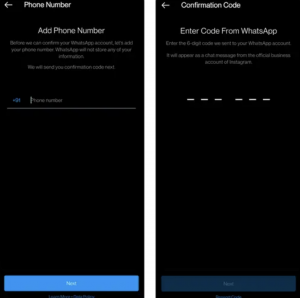
You will be asked to enter a phone number if your account doesn’t already have one. Tap “Next” once you’ve typed in your phone number.
You will now be required to input a security code that you get by SMS when logging into your Instagram account from an unidentified device.
Option 3: Whatsapp
- Enable the WhatsApp toggle.
- You will receive a code from Instagram on your WhatsApp account, which is linked to the same mobile number.
- Open WhatsApp on your phone, click the message from Instagram, copy and enter the code.
2. Making your account private
Make your public account private to take a quick privacy measure. By doing this, you’ll be able to share your images or videos with a small number of people while keeping them private from the general public. Only the individuals you truly care about will be aware of your activities in this manner.
Steps:
- By tapping the “person” icon in the lower-right corner of the screen, you may access your profile. To access the Settings gear icon, swipe to the left and then tap it.
- Select “Privacy and Security” and then click “Account Privacy.”
- Turn on “Private Account.”
3. Block, Restrict and Report.
The majority of us have either witnessed or experienced an offensive comment or just plain spam. You can prevent certain followers from seeing your posts if one of your followers starts to bother you or act worse.

Don’t worry, your followers won’t know you’ve blocked them.
Steps:
- At the very top of the main menu, select “Followers.”
- Find the follower you wish to block by searching.
- Click the remove button and confirm it once more.
There is no 100% method to prevent your account from being hacked. To prevent these occurrences, we must constantly monitor our account.
If you run into trouble, or require assistance, book a 45 minute troubleshooting appointment with a team member.